
Try the example, then check the result.
Download the fictional material and follow the steps below. The video includes 2 marked screenshots from the English app, with illustrative diagrams for the other steps. Product controls may vary by version.
Check the answer before applying the method to your own data. How we review guides ↗
Watch the complete lesson.
The video includes 2 marked screenshots from the English app, with illustrative diagrams for the other steps. English captions. Product menus may differ in your account.
Quick answer. Read the divisor first. If it is zero or blank, decide what that means; for this exercise use =IF(OR(C2="",C2=0),"",B2/C2) so only a valid hours value yields a rate.
Open the fictional workshop rates CSV in an editable Excel workbook copy. Add the rate formulas yourself, then compare all three outcomes with the answer check; CSV files do not preserve formulas.
Before you start. A blank in the result column represents missing or invalid hours in this fictional exercise. If zero hours is a real business state, decide separately how to report it. IFERROR can hide unrelated formula mistakes.
1. Identify the exact divisor
In a workbook copy, put the three practice rows in columns A through C. Put =B2/C2 in D2 and fill down. Packing returns eight, while a zero or blank hours cell produces #DIV/0!. Select a failing formula and inspect column C before touching the result.
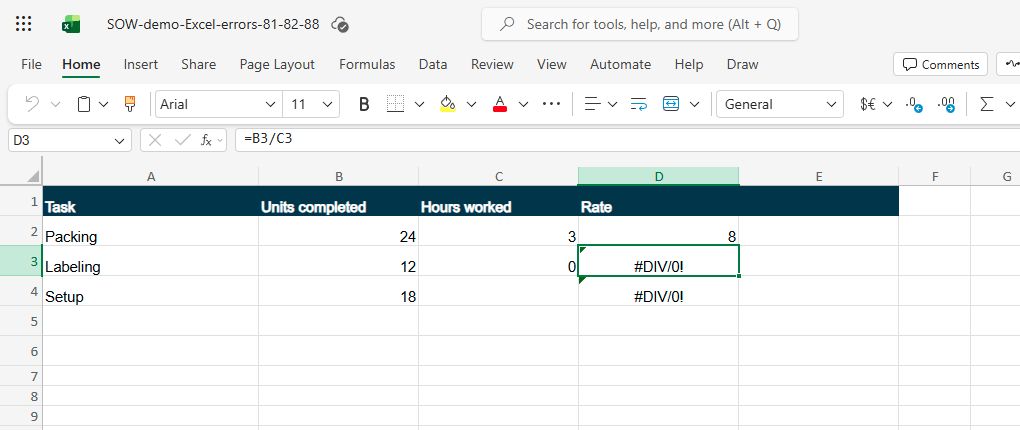
Checkpoint: B2 is 24 and C2 is 3; C3 is zero; C4 is blank.
3. Guard only the denominator
In D2 enter =IF(OR(C2="",C2=0),"",B2/C2) and fill it through D4. The OR test catches both a blank cell and an explicit zero before division occurs. This is narrower than wrapping the whole formula in IFERROR, which could also hide a mistyped numerator or other error.
Checkpoint: Use the exact formula and verify the references move to C3 and C4.
4. Check all three outcomes
Packing still shows eight because twenty-four divided by three is eight. Labeling and Setup now display blank result cells. The source data should remain twelve units with zero hours and eighteen units with missing hours. Compare each row, not just the absence of an error badge.
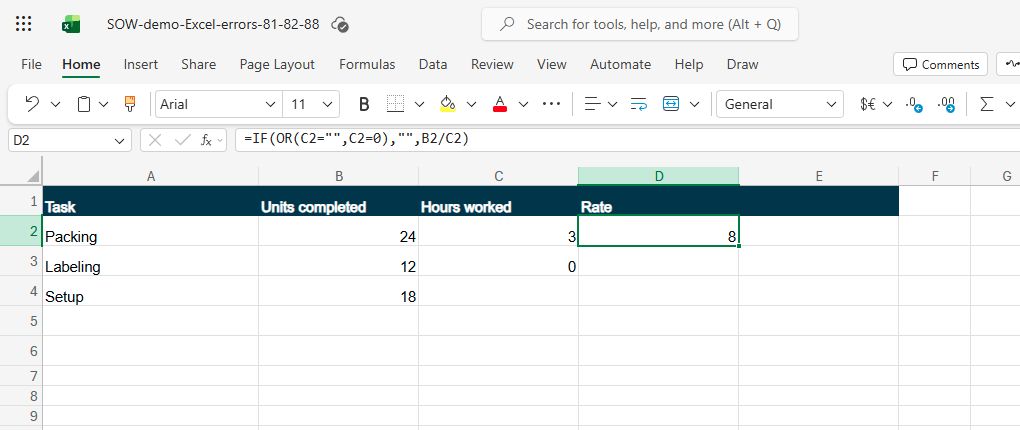
Checkpoint: D2=8; D3 and D4 blank; columns B and C unchanged.
5. When the error has another cause
If a row still shows #DIV/0!, select its formula and inspect the actual denominator reference. It may point at a different cell after a copy or sort. If you see another error instead, do not hide it with IFERROR. Repair that formula or input on a separate copy and rerun the row check.
Checkpoint: A guard solves only the intended blank or zero denominator.
Verify the result
Packing is 8 units per hour. Labeling and Setup have no defined rate because their hours are zero and blank respectively; their result cells stay blank. A blank result is not zero productivity. The original units and hours remain unchanged.
If it still does not work
If the cell still shows #DIV/0!, select that result and inspect its actual denominator reference in the formula bar. Check that the copied formula points to the hours cell on the same row, and that a missing or zero value is what the guard tests. If the hours cell is a valid nonzero number, follow the remaining references in that formula; a broad IFERROR wrapper would conceal a different mistake. Compare D2=8 with D3 and D4 blank in the fictional answer check.
Official sources
- Microsoft Excel product guidance (checked 16 October 2026).
Video panels without a marked actual-app capture are illustrative diagrams of the fictional exercise.
Practice downloads.
The exercise files contain invented information. Save a local copy before editing.